背景
数据要在自己手中。
目标
获取飞书文档信息。可采用如下方式。
- 使用appId和appSecret。需要管理员权限,或需要申请权限。
- 使用飞书客户端。
- 使用网页版。
经研究后,可行的方式只有网页版。
调研
打开任何一篇文档,同时打开开发者中心,打开newtowrk。刷新页面。可以看到network中有很多请求。需要逐个分析。
分析1 ajax请求 获取文档目录树
搜索 get_info 可以看到响应中返回了tree节点,
curl 'https://xxxx.cn/space/api/wiki/v2/tree/get_info/?space_id=7506xxx&with_space=true&with_perm=true&expand_shortcut=true&need_shared=true&exclude_fields=5&with_deleted=true&wiki_token=Zqf9wegxkijPF7k9yHDcbJbEnJb&synced_block_host_token=QDXwdnOWuop7qHxR1WmcSLdQnib&synced_block_host_type=22'需要说明的是参数中有如下参数:
- synced_block_host_token: QDXwdnOWuop7qHxR1WmcSLdQnib 可以任意写,建议长度保持一致
数据来源是文档的html源码(https://xxx.feishu.cn/wiki/WIKI_KEY)中 有这样一段配置if (!window.current_space_wiki || !window.current_space_wiki.space_id) { window.current_space_wiki = Object({ "space_id": "7506xxx", "space_icon": "https://lf-package-cn.feishucdn.com/obj/creation-image-system/xxxxx~160x160.png", "space_type": 2, "create_uid": "xxxx", "wiki_token": "xxxxxx", "obj_token": "QDXwdnOWuop7qHxR1WmcSLdQnib", "obj_type": 22, "home_page": { "wiki_token": "", "obj_token": "", "obj_type": 0 }, "wiki_version": "2" }); } - synced_block_host_type: 22 目前看到都是22
- space_id: 同synced_block_host_token
接口返回的重要属性如下:
- tree.root_token 对应文档库的唯一key(猜测)
- tree.root_list 对应当前文档库的一级子文档唯一key的列表(有顺序)
- tree.child_map 是json对象,key是tree.root_key,value是tree.root_list。在页面上看时大部分都是只有一个key-value,使用接口调用有时会返回两个key-value,另一个key是当前父文档的key
- tree.paths 是当前页面的面包屑路径。有几个值说明当前是几级文档(root_token是一级文档)
- tree.nodes 是tree.root_listk中的文档唯一key与文档基本信息(如url/title)的关系
tree.nodes节点的value值的重要属性如下
- has_child: true 是否有子文档
- obj_token : “VP75dFWf4oVd9uxr6IEcBPSlnmd”
- obj_type: 22
- origin_space_id: “7506702189667106844”
- origin_wiki_token: “FBhqwcGQqiiOJFkcUi1c8XatnWD”
- parent_wiki_token: “T1vMw41qnidu4ikkEkQcMn1Anzb”
- space_id: “7506702189667106844”
- title: “问题记录” 文档标题
- url: “https://xxx.feishu.cn/wiki/yyyy" 文档url
- wiki_token: “yyyy” 文档唯一key
分析2 请求页面 获取文档页面数据
先访问 https://bcn01r79hk9u.feishu.cn/wiki/DeaGw42bqi05LMkgj0Lc7cIZned ,即可获取到数据。注意页面中有如下代码 window.DATA = Object.assign({}, window.DATA, { clientVars: Object({"data": 它就是页面的块内容。其中有个字段叫has_more,文档中的内容少时此值为false, 较多时此值为true。且会调用ajax请求去获取剩余内容。请求的接口是
分析2 额外
飞书个人文档库首页是这样的。
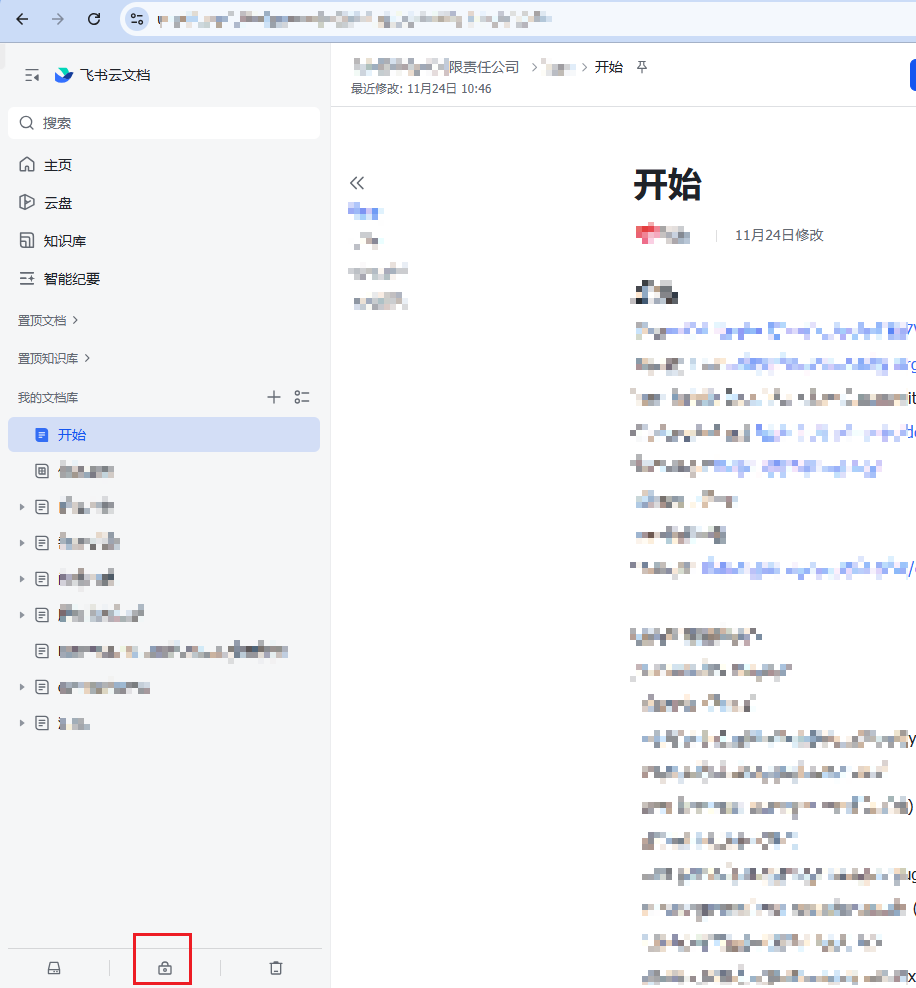
左边中部有文档列表。(飞书文档没有目录的概念,一个文档可以有子文档,类似文件夹。每个文档都有一个唯一id,如SQGqwCJseisalxkV1HccirEZnPb)。
上图底部红框中是“权限管理”,点击后显示了分页的文档列表,往下拉可以获取更多数据。对应的请求及参数(删除了token信息)是:
# 首次访问时

curl 'https://u0sf1t5xqzx.feishu.cn/space/api/suite/permission/audit_tool/search/' \
  -H 'accept: application/json, text/plain, */*' \
  -H 'accept-language: en,zh-CN;q=0.9,zh;q=0.8' \
  -H 'content-type: application/json' \
  --data-raw '{"page_condition":{"limit":50,"cursor":""},"filter":{"secret_id":[],"obj_type":["all"],"collaborators_num":["all"],"perm_setting":["all"],"title_keywords":[],"create_time_range":[],"redeployment_transfer_retain":[]},"sort_rules":[4]}'
# 第二次及之后的访问,多了cursor参数,cursor来自上一次查询的返回值
curl 'https://xxx.feishu.cn/space/api/suite/permission/audit_tool/search/' \
-H 'accept: application/json, text/plain, */*' \
-H 'accept-language: en,zh-CN;q=0.9,zh;q=0.8' \
-H 'content-type: application/json' \
--data-raw '{"page_condition":{"limit":20,"cursor":"[1762420630,\"7569535898959593475\"]"},"filter":{"secret_id":[],"obj_type":["all"],"collaborators_num":["all"],"perm_setting":["all"],"title_keywords":[],"create_time_range":[],"redeployment_transfer_retain":[]},"sort_rules":[4]}'但没有目录结构。
作者:张三 创建时间:2025-12-03 16:34
最后编辑:张三 更新时间:2026-01-14 17:39
最后编辑:张三 更新时间:2026-01-14 17:39